Distributed Data Cache
This guide describes how to use distributed data cache to stream data into distributed TrainJobs.
Overview
The data cache feature enables efficient data streaming for distributed training workloads by:
Pre-processing and caching data in a distributed Arrow cache cluster
Streaming data directly to training nodes without redundant preprocessing
Enabling scalable data access across multiple training nodes
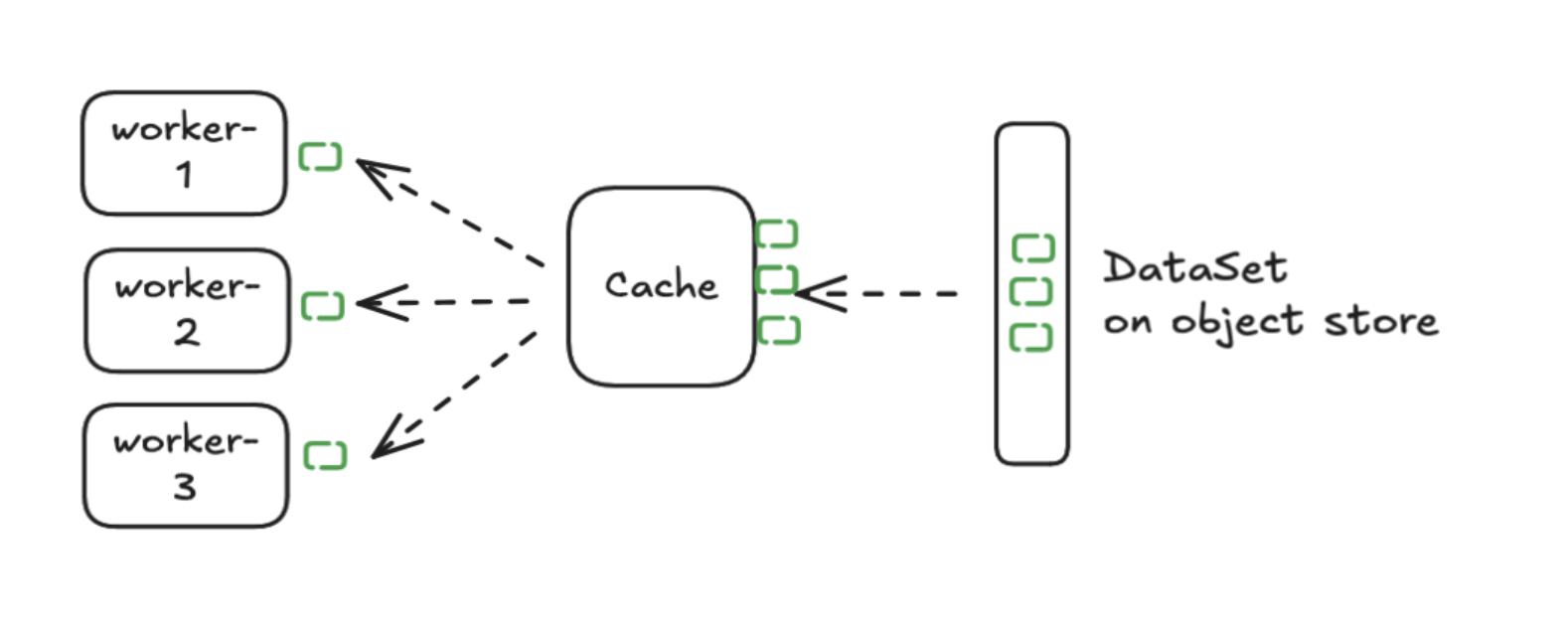
Data cache automatically fetches data from object store and partitions it across data nodes:
Multiple TrainJobs can access data from the cache using the Apache Arrow Flight protocol:
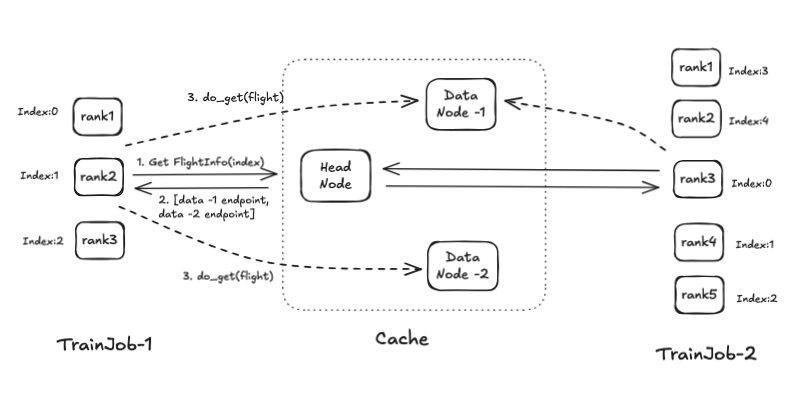
The data cache is powered by Apache Arrow and Apache DataFusion to effectively store data in-memory with zero-copy transfer to GPU nodes.
Architecture
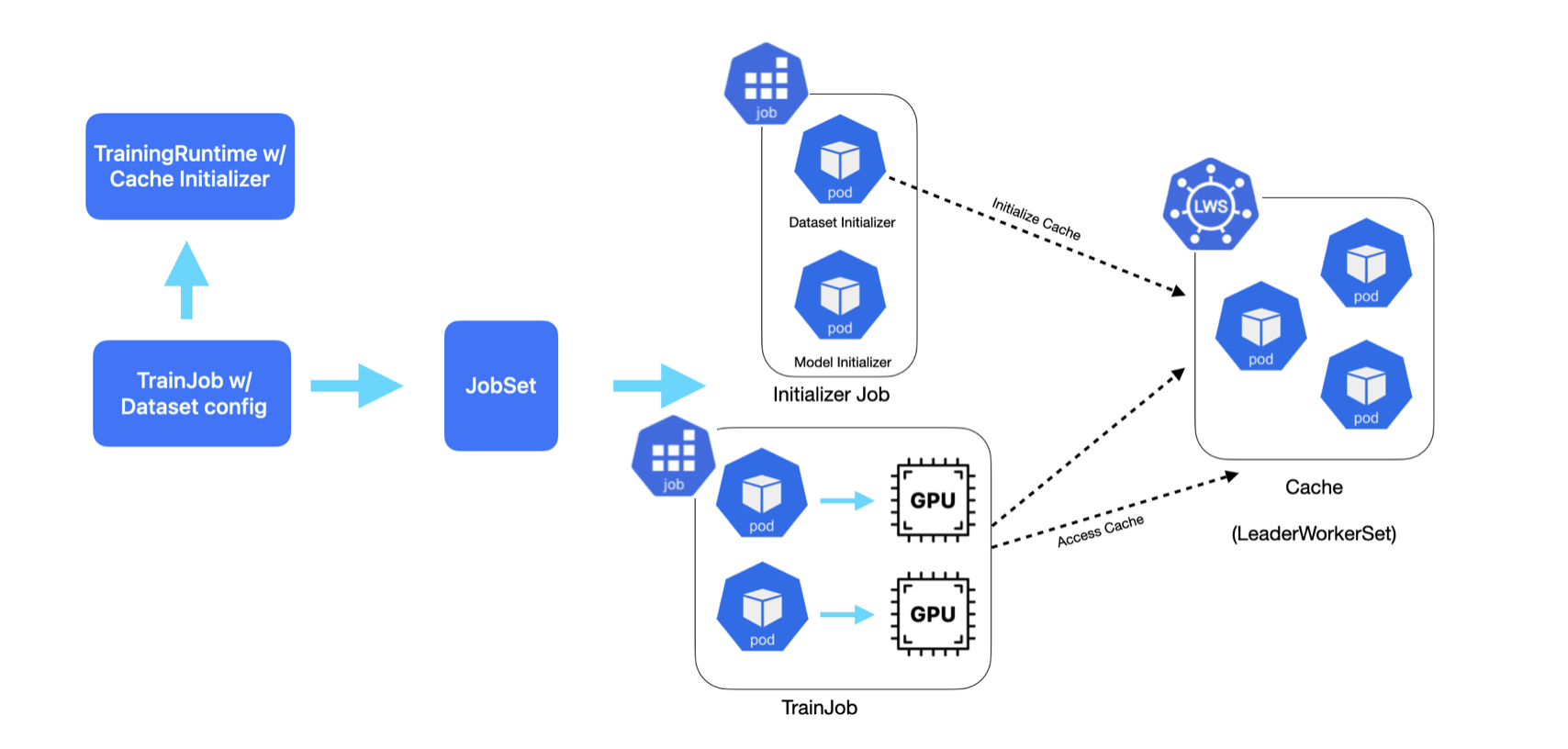
The training workflow consists of two stages:
Dataset Initializer: Sets up a distributed cache cluster that preprocesses and serves the training data
Training Nodes: Stream data from the cache and perform model training
Prerequisites
Follow these steps to install the data cache control plane.
Install Data Cache Control Plane
You need to install the following resources to use data cache:
Kubeflow Trainer controller manager
LeaderWorkerSet controller manager
ClusterTrainingRuntime with cache support:
torch-distributed-with-cacheRBAC resources needed for initializer to bootstrap cache
Run the following command to install the required resources:
export VERSION=v2.1.0
kubectl apply --server-side -k "https://github.com/kubeflow/trainer.git/manifests/overlays/data-cache?ref=${VERSION}"
For the latest changes run:
kubectl apply --server-side -k "https://github.com/kubeflow/trainer.git/manifests/overlays/data-cache?ref=master"
Install with Helm Charts
Alternatively, you can install the data cache resources using Helm charts:
helm install kubeflow-trainer oci://ghcr.io/kubeflow/charts/kubeflow-trainer \
    --set dataCache.enabled=true \
    --namespace kubeflow-system \
    --create-namespace \
    --version ${VERSION#v}
For the available Helm values to configure data cache, see the kubeflow-trainer Helm chart documentation.
Note
When dataCache.lws.install is set to true (the default), LeaderWorkerSet will be installed
automatically. Set it to false if LeaderWorkerSet controller/webhook is already installed
in your cluster.
Warning
Helm charts don’t install RBAC in the user namespace. You have to deploy RBAC separately in each namespace where you want to create TrainJobs:
kubectl apply --server-side -n <NAMESPACE> -k "https://github.com/kubeflow/trainer.git/manifests/overlays/data-cache/namespace-rbac"
Verify Installation
Check that runtime is installed:
$ kubectl get clustertrainingruntime

NAME                           AGE
torch-distributed-with-cache   14h
Check that RBAC is installed in your namespace:
$ kubectl get sa,rolebinding -n default | grep cache-initializer

serviceaccount/kubeflow-trainer-cache-initializer
rolebinding.rbac.authorization.k8s.io/kubeflow-trainer-cache-initializer
Prepare Your Dataset
Your data should be in Iceberg table format stored in S3
You’ll need the metadata location (S3 path to
metadata.json)Define a storage URI for the cache
You can use the PyIceberg library or distributed processing engine like Apache Spark to prepare your Iceberg table in S3.
Running the Example
Open the fine-tune-with-cache.ipynb Notebook and follow the steps:
Install the Kubeflow Trainer SDK
List available runtimes and verify
torch-distributed-with-cacheis availableDefine your training function with
DataCacheDatasetCreate a TrainJob with
DataCacheInitializerconfigurationMonitor the training progress and view logs
Configuration
Runtime Configuration
The torch-distributed-with-cache runtime includes:
Dataset Initializer Job: Deploys a cache cluster with configurable settings:
CACHE_IMAGE: Docker image for the Arrow cache serverTraining Job: Connect to the cache service to stream data during distributed training.
Initializer Parameters
The example uses DataCacheInitializer initializer to bootstrap the cache cluster. You can
adjust settings for your storage configuration:
DataCacheInitializer(
    storage_uri="cache://schema_name/table_name",      # Cache storage URI
    metadata_loc="s3a://bucket/path/to/metadata.json", # S3 path to Iceberg metadata
    iam_role="arn:aws:iam::123456:role/test-role",     # IAM role to access Iceberg table
    num_data_nodes=4,                                  # Number of data cache nodes.
)
You can find all available configurations for DataCacheInitializer in
the Kubeflow SDK.
PyTorch Iterable Dataset
The example uses a DataCacheDataset which is subclass of
the PyTorch Iterable Dataset.
This dataset:
Connects to the cache service via Arrow Flight protocol
Distributes data shards across training workers and nodes
Streams RecordBatches and converts them to PyTorch tensors
Supports custom preprocessing for your specific use case
You can extend DataCacheDataset and override from_arrow_rb_to_tensor() to customize data
preprocessing for your model.
Next Steps
Dive deep into the Kubeflow Data Cache proposal
Experiment with the data cache cluster locally
Learn more about this feature in KubeCon + CloudNativeCon London talk, KubeCon + CloudNativeCon India talk, and GenAI summit talk